

Technology and AI
Business Intelligence Developer Example Resume
Download a free ATS-friendly DOCX example resume for Business Intelligence Developer roles. Use it to see how a one-page resume can present measurable results, job-specific skills, and clean section structure without a decorative layout that can make parsing harder.
Format
Editable DOCX
Layout
One-page resume
Cost
Free download
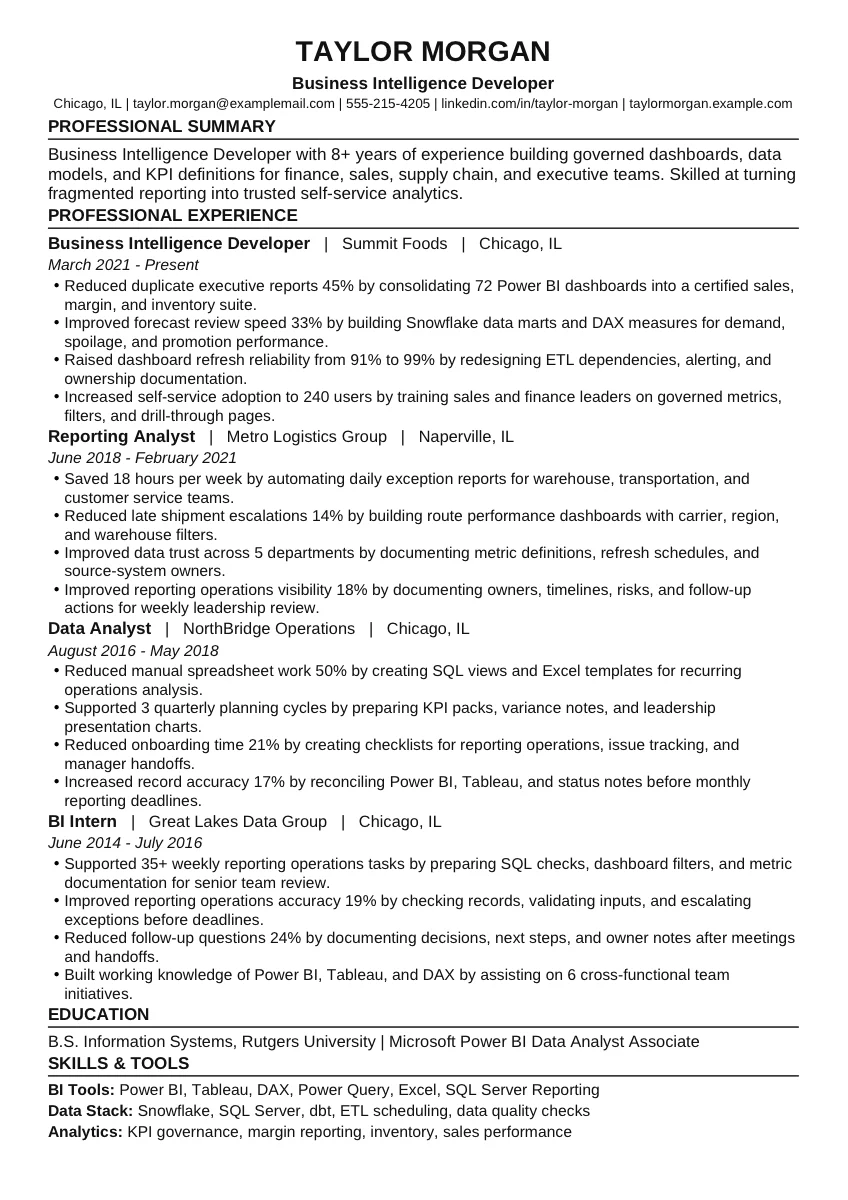
Fictional example resume. Replace all names, credentials, employers, dates, metrics, and contact details before applying.
Example snapshot
What this Business Intelligence Developer resume example shows.
Business Intelligence Developer with 8+ years of experience building governed dashboards, data models, and KPI definitions for finance, sales, supply chain, and executive teams. Skilled at turning fragmented reporting into trusted self-service analytics.
Reduced duplicate executive reports 45% by consolidating 72 Power BI dashboards into a certified sales, margin, and inventory suite.
Improved forecast review speed 33% by building Snowflake data marts and DAX measures for demand, spoilage, and promotion performance.
Raised dashboard refresh reliability from 91% to 99% by redesigning ETL dependencies, alerting, and ownership documentation.
ATS keywords
Skills and resume keywords included in this example.
The DOCX example groups skills in a way that is easy to scan and easy to edit. Use these sections as a starting point, then match the final wording to the job description you are applying to.
BI Tools
Power BI, Tableau, DAX, Power Query, Excel, SQL Server Reporting
Data Stack
Snowflake, SQL Server, dbt, ETL scheduling, data quality checks
Analytics
KPI governance, margin reporting, inventory, sales performance
Make it yours
How to tailor this Business Intelligence Developer example resume.
Step 1
Rewrite the summary around your strongest bi tools evidence instead of leaving the fictional candidate profile in place.
Step 2
Keep the data stack section specific to the target job description so the resume reads naturally to both ATS software and recruiters.
Step 3
Replace every metric in the sample bullets with verified results from your own work, especially in the analytics area.
Step 4
Keep the DOCX layout simple: standard section headings, readable text, no text boxes, and no image-only resume content.
Before you apply
Use the example, then check it against the job description.
Example resumes are a starting point. InterviewsPilot can help you compare your edited resume to a target role, find missing keywords, and turn the free DOCX into a stronger application.
FAQ
Questions about this example resume.
Is this Business Intelligence Developer example resume free?
Yes. This Business Intelligence Developer example resume is a free DOCX download. You can open it in Microsoft Word, Google Docs, or another compatible editor and replace the fictional content with your own details.
Is this Business Intelligence Developer example resume ATS-friendly?
Yes. The example uses a clean one-page structure, standard resume headings, readable text, and a straightforward layout designed to reduce common ATS parsing problems.
Can I copy the Business Intelligence Developer resume bullet points?
Use the bullet points as structure, not as final copy. Replace the fictional employers, metrics, tools, credentials, and scope details with accurate information from your own experience.
What file format is included?
The download is an editable DOCX resume example. After editing it, you can keep a DOCX version for future tailoring and export a PDF when a job application asks for one.