





Job searching can quickly become disorganized. Roles are scattered across job boards, company career pages, LinkedIn, and email threads. Without a reliable system, it is easy to forget where you applied, lose track of follow-ups, or waste time rebuilding the same information in different places. Job Application Tracker — Track & Organize Your Job Search For a noncommercial baseline on planning and tracking applications, CareerOneStop's job search guidance is a useful reference.
That is why many candidates look for free applicant tracking systems for job seekers. These tools act like a personal job search hub: they help you save jobs, track application stages, store notes, and stay organized from first discovery to final interview.
What Is a Free Applicant Tracking System for Job Seekers?
A free applicant tracking system for job seekers is a tool that helps you manage your own application pipeline. It is not the same thing as the recruiter-facing ATS used by employers. Instead, it functions more like a job search CRM, giving you one place to track opportunities, deadlines, contacts, and next steps.
For many people, the biggest value is simple: it replaces scattered spreadsheets and memory-based tracking with a structured workflow.
What Problem Does a Job Search Tracker Solve?
The main issue is disorganization. A job search often includes dozens of open tabs, saved jobs, draft emails, and follow-up reminders. Without a central system, you may:
- Forget when you applied
- Lose the wording of the original job description
- Miss follow-up windows
- Duplicate applications
- Struggle to compare roles side by side
A dedicated tracker solves these problems by centralizing your search. It gives you a clear view of your pipeline so you can move from reactive job hunting to a more intentional job search strategy.
What Features Matter Most in Free Applicant Tracking Systems for Job Seekers?
Not every free tracker offers the same experience. If you are comparing tools, focus on features that actually support your job application workflow.
1. One-click job saving
A browser extension or bookmark tool lets you save jobs from major job boards and company career pages without manual copy-pasting. This is one of the biggest time savers because it captures the core details instantly.
2. Pipeline or stage tracking
A good tracker should let you move each role through stages such as:
- Wishlist
- Saved
- Applied
- Interviewing
- Offer
- Rejected
This makes it easier to see where each application stands and what needs attention next.
3. Job description insights
Some tools analyze the job description after you save it. They may surface keywords, skills, or company details that help you tailor your resume and cover letter more quickly.
4. Contact management
If you network during your search, contact management is helpful. You can store recruiter names, hiring manager details, and notes about conversations so that nothing gets lost.
5. Checklists and notes
A simple checklist can help you remember tasks like:
- Tailor resume
- Write cover letter
- Submit application
- Send follow-up email
- Prepare interview notes
Private notes are also useful for salary research, company culture observations, and interview prep.
Application Tracker
Applying to 10+ jobs? You need a real system.
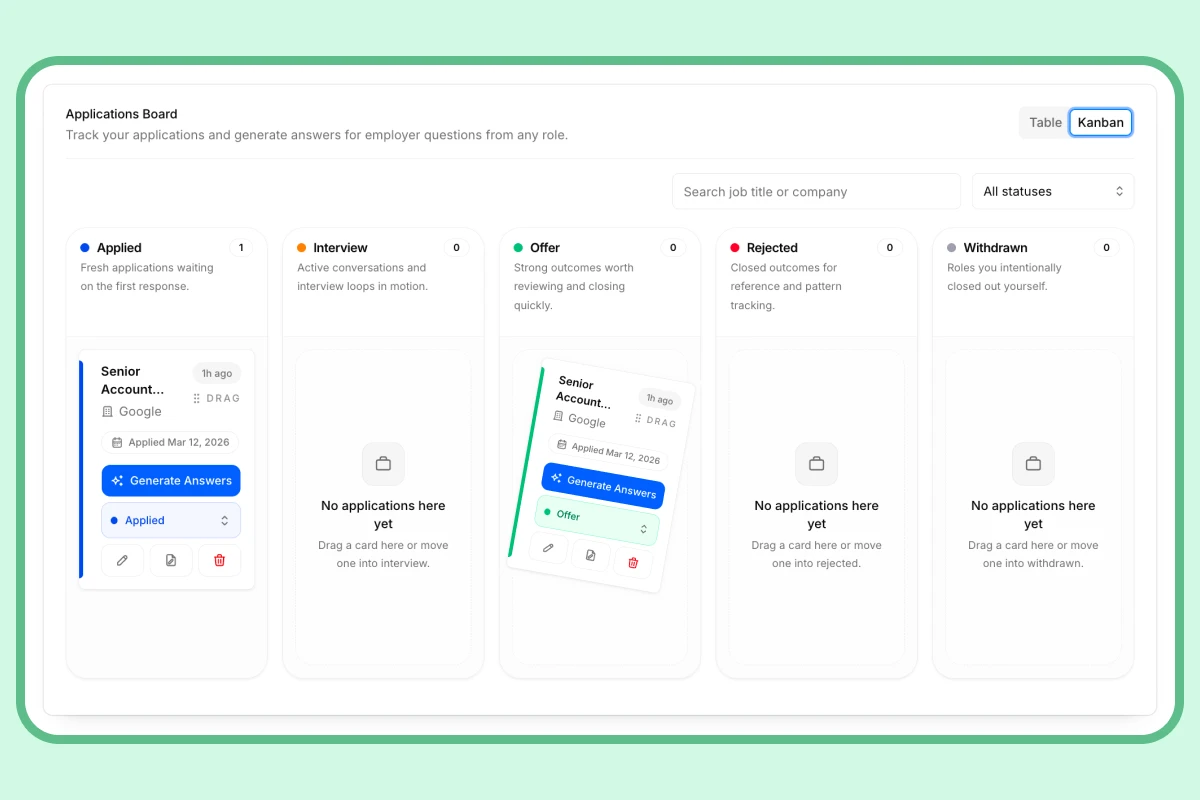
No more spreadsheets or lost threads. Track every role, stage, deadline, and follow-up in one dashboard — so you always know exactly where you stand.
How Does InterviewsPilot’s Job Tracker Fit Into This Category?
InterviewsPilot’s Job Application Tracker is a strong example of how a free job seeker tracker can work like a personal ATS. It brings together job saving, application tracking, keyword insights, and workflow tools in one place.
Users can save jobs with a Chrome Extension, organize them by stage, and review extracted job details to support application tailoring. The tool also connects with resume-building features and other job search resources, which makes it more useful than a standalone spreadsheet.
In practical terms, this means the tracker is not just helping you store jobs. It is helping you manage the entire application process.
Why Use a Free Job Tracker Instead of a Spreadsheet?
Spreadsheets are flexible, but they are manual. A dedicated tracker usually offers a better experience for an active job search.
| Feature | Spreadsheet | Free Applicant Tracking System |
|---|---|---|
| Adding jobs | Manual copy and paste | Often saved with a browser extension |
| Organization | Static columns and filters | Visual pipeline or board view |
| Follow-up tracking | Manual reminders | Built-in notes, stages, and reminders |
| Job insights | None unless added by hand | May extract keywords and skills |
| Workflow support | Separate documents and tabs | Centralized job search hub |
The biggest advantage is not just convenience. It is consistency. A tracker makes it easier to build a repeatable job search strategy.
Are Free Applicant Tracking Systems for Job Seekers Really Free?
Usually, yes for the core features, but often not for everything.
Many tools in this category use a freemium model. That means the free version may include enough functionality for tracking applications, saving jobs, and managing contacts, while advanced features are reserved for paid plans.
Before choosing a tool, check whether the free tier includes the basics you actually need:
- Unlimited job saves or a usable cap
- Contact tracking
- Pipeline stages
- Notes and reminders
- Browser extension support
If the free version does not help you stay organized, it probably is not the right fit.
What Are the Best Alternatives to a Dedicated Job Tracker?
There are several ways to manage applications, but each has tradeoffs.
Spreadsheet templates
Google Sheets and Excel are free and customizable. They work well if you want full control, but they require manual data entry and do not offer automation.
Project management tools
Tools like Trello or Asana can be adapted for job search strategy. They are visual and flexible, but they are not built specifically for job application help.
Other job trackers
Dedicated tools such as Huntr offer similar application tracking features. These platforms are often compared on ease of use, pipeline design, and job-saving workflows.
Recruiter ATS platforms
Systems built for employers are a different category entirely. They are designed to manage candidates, not to help candidates manage their own search.
AI Interview Prep
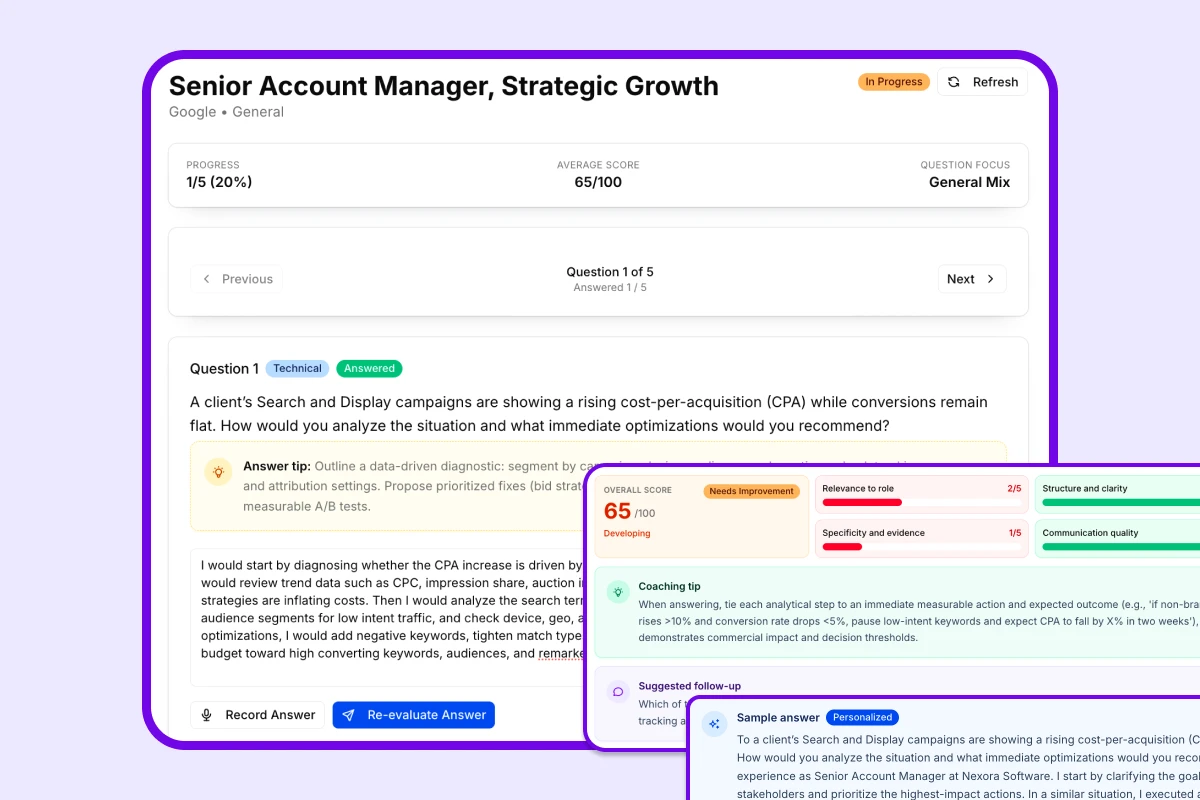
Got the interview? Now make sure you're ready.
Practice the exact questions likely to come up for your target role. Get scored on clarity, structure, and relevance — so you walk in sharp, not winging it.
How Should You Use a Job Tracker in Your Job Search Strategy?
A tracker works best when it supports a disciplined process. Here is a practical approach:
1. Save roles immediately
If a job looks interesting, save it right away. Do not rely on memory or browser tabs.
2. Keep stages accurate
Move applications forward as your status changes. Accurate tracking helps you understand what is working.
3. Tailor applications using keywords
Review the job description before you apply. Use relevant keywords and required skills to align your resume and cover letter.
4. Track follow-ups
Set a reminder for thank-you emails, status checks, and recruiter outreach. Consistent follow-up is part of effective job application help.
5. Review your pipeline regularly
Check your tracker weekly to see how many roles are in each stage and where you may need to improve.
What Questions Should You Ask Before Choosing a Free Tracker?
What problem am I trying to solve?
If your main issue is scattered applications, choose a tool that centralizes your pipeline.
Do I need automation or just simple storage?
If you only need a basic list, a spreadsheet may be enough. If you want a more strategic workflow, a dedicated tracker is better.
Will I actually use it every week?
The best tool is the one you will consistently update.
Does the free version cover my real needs?
Make sure the free tier includes saving, organizing, and following up without forcing you into premium features too quickly.
How Can a Job Tracker Improve Application Quality?
A good tracker does more than store data. It can improve the quality of your applications by helping you:
- Compare roles before applying
- Identify recurring skills and keywords
- Personalize resumes faster
- Keep recruiter conversations organized
- Avoid missing deadlines and follow-ups
That is why these tools are often described as a mix of job search strategy and job application help.
Conclusion: A Better Way to Manage Your Job Search
Free applicant tracking systems for job seekers are useful because they bring structure to a process that is often chaotic. Instead of relying on memory, bookmarks, and spreadsheets, you get one place to manage applications, notes, stages, and follow-ups.
If you are actively applying to jobs, a tracker can save time and reduce stress while helping you stay more strategic. The best option is the one that fits your workflow, supports your job search strategy, and makes it easier to tailor each application with confidence.
FAQ
What is a free applicant tracking system for job seekers?
It is a tool that helps candidates organize job applications, track stages, save notes, and manage follow-ups in one place.
How is a job seeker ATS different from an employer ATS?
A job seeker ATS is built for personal application tracking. An employer ATS is built to manage incoming candidates and hiring workflows.
What features should I look for in a free job tracker?
Look for job saving, pipeline tracking, notes, contact management, and useful insights from job descriptions.
Is a spreadsheet enough for job application help?
It can be, but spreadsheets are manual and do not usually provide automation or job-specific workflow features.
Can a job tracker help me tailor my resume?
Yes. If the tracker extracts keywords or job details, it can make resume tailoring faster and more consistent.
Explore this category
Job Applications
Browse the full job applications category for more related playbooks, examples, and tactical guides.
Browse Job Applications articles →One workflow. Resume to offer.
Build ATS-ready resumes, track every application, and practice interviews — all in one place. Free to start, no credit card needed.
✓ Free plan forever · ✓ No card needed
Related articles
Organize Job Search: A Step-by-Step System for Tracking Applications, Follow-Ups, and Materials
Need a better way to manage your job hunt? This guide shows how to organize your job search with a practical tracking system for applications, documents, contacts, and follow-ups.
Email Subject for Job Application: A Practical Guide
Your email subject line is the first thing a hiring manager sees. Learn how to write a clear, concise, professional subject for a job application that gets opened and makes your intent obvious.
How Many Jobs Should I Apply For? 2025 Job Search Strategy and Weekly Application Targets
Wondering how many jobs you should apply for? This guide breaks down weekly and total application targets, explains when to prioritize quality over quantity, and shows how to build a smarter job search plan for your timeline.