





Answer-First Summary: Resume keywords are the specific skills, qualifications, and job titles that connect your experience to a job description. They are critical because Applicant Tracking Systems (ATS) parse your resume to make it searchable for recruiters, and recruiters themselves use these terms to find candidates. Effective keyword use isn't about tricking software; it's about precise, relevant communication to ensure your resume is found and understood. The core process involves systematically extracting terms from job descriptions and integrating them naturally into your resume's content. For skills language that maps to real occupations, O*NET Online is a useful noncommercial reference.
What Are Resume Keywords and Why Do They Matter for ATS?
Resume keywords are the concrete terms—including hard skills (e.g., "Python," "Financial Modeling"), soft skills (e.g., "Project Management," "Cross-functional Collaboration"), tools, certifications, and job titles—that reflect the requirements of a role. Their importance is twofold. First, an ATS indexes these terms, creating a searchable database for recruiters. Second, recruiters actively search using these keywords to filter and find qualified candidates. Therefore, aligning your resume's language with the job description is fundamental to visibility. As InterviewsPilot notes, this process "bridges the gap between your qualifications and what the job description is asking for".
Understanding the mechanics is crucial. An ATS functions less as a gatekeeper and more as a sophisticated librarian. It doesn't typically make autonomous rejections; instead, it organizes and tags your resume content based on the keywords it parses. When a recruiter initiates a search—for instance, for "Salesforce Administrator" or "CPA certification"—the system returns a ranked list of resumes where those terms appear prominently and contextually. This means your resume's discoverability hinges directly on the presence and strategic placement of these terms. Failing to include them is akin to filing a book under the wrong category in a vast library; it may contain the right information, but it will remain unseen by those searching for it.
Free ATS Score
Your resume might be invisible to recruiters
Most resumes are filtered out before a human ever sees them. Get your free ATS score and see exactly where your resume falls short — before you hit send.
What Steps Should You Take to Find Keywords from a Job Description?
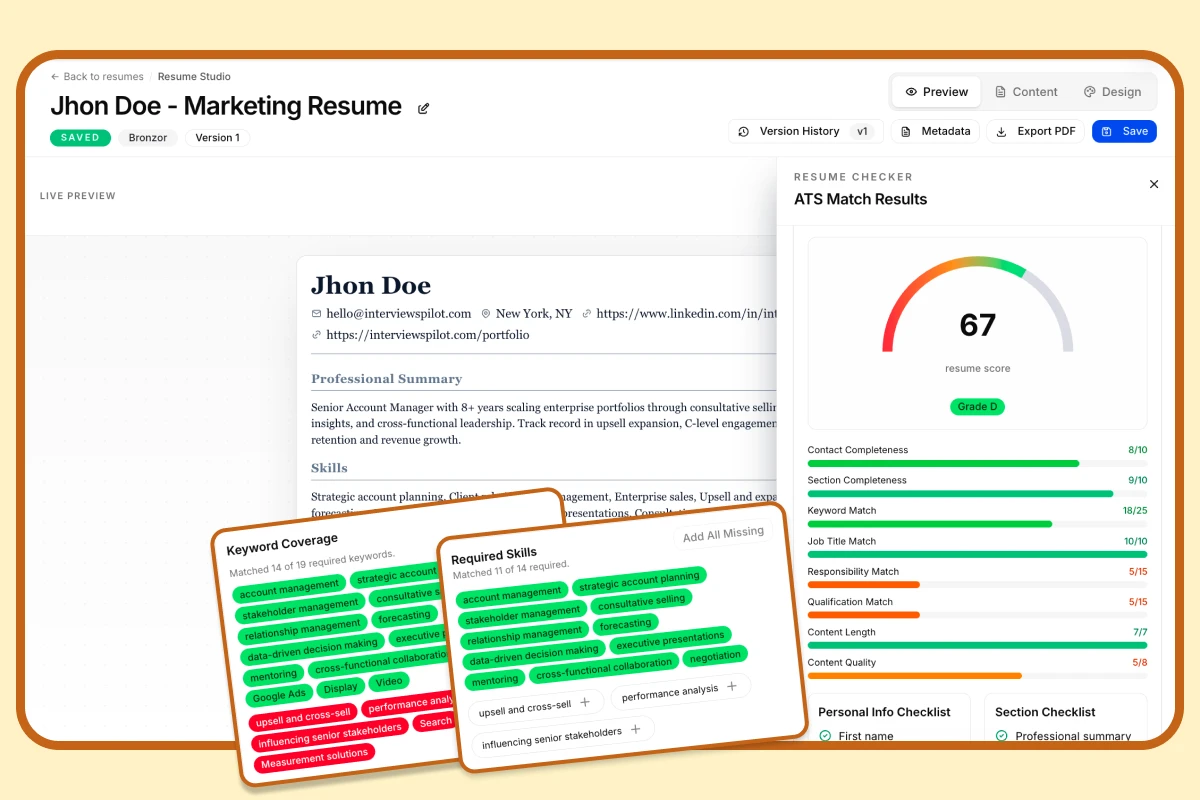
The most reliable method for finding relevant keywords is a direct, analytical dissection of the job posting. Avoid skimming; instead, treat the description as a primary source document. Follow this actionable, four-step process for comprehensive extraction.
- Identify Core Requirements: Start by highlighting the job title, required skills, and explicit "must-have" qualifications. These are your non-negotiable primary keywords.
- Scan for Recurring Themes and Synonyms: Look for terms that are repeated or emphasized across the "Responsibilities," "Qualifications," and "Preferred Skills" sections. Also, note synonyms. If a posting mentions "data analysis," "analytics," and "metrics interpretation," all are valuable keywords. Phrases like "proven experience in," "strong knowledge of," or "proficiency with" are direct signals introducing critical keywords.
- Extract Implied Keywords: Some keywords aren't explicitly listed but are implied by the role's context. For a "Digital Marketing Manager" role requiring "Google Ads" and "Facebook Blueprint," implied keywords might include "ROI optimization," "conversion rate," and "A/B testing." Read between the lines of the responsibilities to identify these.
- Categorize Your Findings: Organizing the terms helps with logical integration later. Use a table or list to group them.
| Category | Examples from a "Marketing Manager" JD | Examples from a "Software Engineer" JD |
|---|---|---|
| Hard Skills & Tools | SEO/SEM, Google Analytics, CRM (e.g., Salesforce), CMS, PPC | Python, Java, React, AWS, Docker, Git, REST APIs |
| Soft Skills & Abilities | Brand Strategy, Team Leadership, Budget Management, Data-Driven Decision Making | Agile/Scrum, Code Review, Problem-Solving, Cross-team Collaboration |
| Certifications & Education | Google Ads Certification, BA in Marketing | AWS Certified Solutions Architect, BS in Computer Science |
| Action Verbs & Phrases | Develop strategy, Analyze performance, Manage budget, Increase ROI | Develop scalable applications, Debug complex issues, Optimize performance, Implement features |
This structured approach moves beyond guesswork to targeted optimization. For broader validation, compare your terms against several live job descriptions and occupational skill language from O*NET Online so you do not miss common industry terms.
How Do Applicant Tracking Systems Actually Use Resume Keywords?
A pervasive and damaging misconception is that ATS software acts as an autonomous rejection machine, automatically discarding resumes that don't meet a secret score. In reality, most modern ATS platforms (like Workday, Greenhouse, Lever) are designed as intelligent recruitment databases. Their primary function is parsing—breaking down your resume's text into structured, searchable fields (name, skills, experience, education).
The critical human element comes next. Recruiters and hiring managers use the ATS's search interface, much like using a search engine, to find candidates. They input Boolean search strings combining keywords (e.g., "JavaScript AND React AND NOT Angular"). The ATS then returns resumes ranked by relevance based on keyword presence, proximity, and frequency. Your goal is not to "beat a robot" with tricks but to ensure your resume is accurately parsed and highly relevant for these human-driven searches.
AI Resume Builder
Stop sending the same resume to every job
Paste any job description and InterviewsPilot rewrites your resume around it — keywords, bullets, and summary aligned to what recruiters are actually scanning for.
What Are the Best Practices for Integrating Keywords into Your Resume?
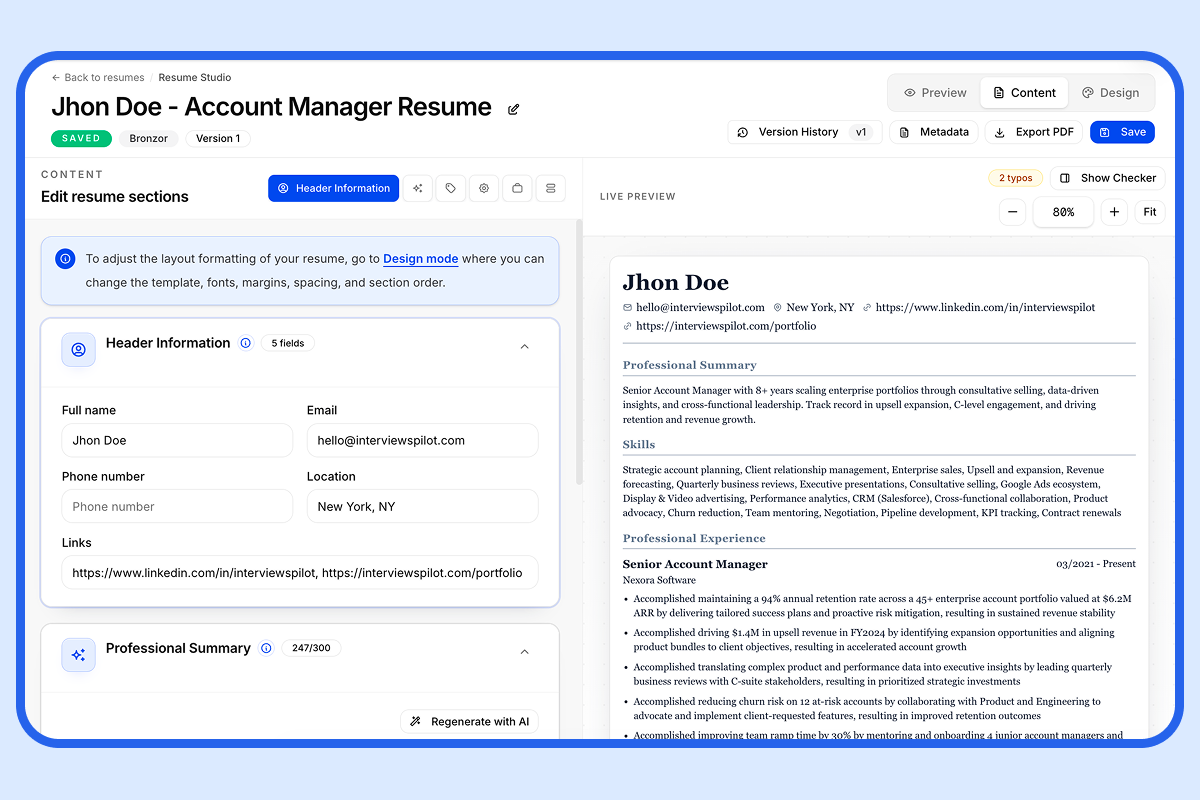
Finding keywords is only half the battle; integrating them effectively—naturally and contextually—is what separates a readable resume from a spammy one. Avoid "keyword stuffing," which can make your resume read unnaturally, hurt readability, and may even be penalized by more advanced parsers. Instead, focus on strategic, natural integration across all sections:
- Professional Summary/Profile: Weave 3-4 of the most critical, high-level keywords into your 2-3 sentence opening. Example: "Results-driven Digital Marketing Manager with 7+ years of experience in SEO/SEM strategy, PPC campaign management, and data-driven analytics to increase lead generation and ROI."
- Work Experience Bullet Points: This is the most important area for integration. Use the Action Verb + Keyword + Metric formula. Start each bullet with a strong action verb, incorporate the keyword, and quantify the result.
- Weak: "Responsible for social media."
- Strong: "Developed and executed a comprehensive social media marketing strategy across 3 platforms, increasing brand engagement by 40% and driving a 15% rise in website traffic over 6 months."
- Dedicated "Skills" or "Core Competencies" Section: Use a clean, bulleted list or a table format to showcase hard skills, software proficiencies, methodologies, and languages. This provides a dense, scannable block of keywords for both ATS and time-pressed recruiters. Categorize them (e.g., "Technical Skills," "Project Management," "Languages") for even better clarity.
- Job Titles and Certifications: Ensure your listed job titles align with common industry terminology. If you were a "Growth Hacker" but the target role is "Senior Marketing Manager," consider using "Marketing Manager (Growth)" to capture the keyword. List certifications with their full, recognized names (e.g., "Project Management Professional (PMP)").
Use keywords to strengthen the resume's content and tell a clear story, rather than treating them as a standalone mechanical tactic.
What Common Myths About ATS and Keywords Should You Ignore?
Debunking these myths can save you significant time, reduce anxiety, and focus your efforts on what truly matters:
- Myth: ATS automatically rejects resumes based on a score. Reality: Most do not have a universal pass/fail score. They rank candidates based on search relevance for a specific query. A human always reviews the results list.
- Myth: Fancy formatting, graphics, and columns help you stand out. Reality: Complex layouts, headers/footers, text boxes, and images often confuse the parser, causing text to be misread, jumbled, or omitted entirely. Stick to a clean, single-column format with standard fonts (Arial, Calibri, Times New Roman) and use simple bullet points.
- Myth: You need to hit a specific "keyword density" (e.g., 3-5%). Reality: There is no proven, universal magic number. Over-optimization for density can lead to stuffing. Focus on comprehensive coverage (including synonyms and related terms) and natural placement within meaningful context.
- Myth: Only exact keyword matches count. Reality: While exact matches are powerful, modern ATS and recruiters understand synonyms and related concepts. Using "financial analysis," "financial modeling," and "FP&A" demonstrates a richer, more nuanced skill set than repeating one term.
- Myth: The "white text on white background" trick works. Reality: This is a black-hat tactic that most modern parsers can detect. It will likely get your resume flagged as spam or manipulative, destroying your credibility.
How Can You Go Beyond Basic Keyword Optimization?
While matching keywords is the foundational step, advanced candidates should layer on these strategies to create a truly standout application:
- Build a Master Keyword List: Don't just analyze one job description. Analyze 5-10 postings for your target role across different companies. Compile all the keywords into a master list, noting which ones are universal ("core" skills) and which are company-specific. This prepares you for multiple applications and helps you understand the full landscape of your field.
- Research Industry-Specific Language and Buzzwords: Keywords evolve. Follow credible industry publications, read several current job descriptions, and note terminology used in annual reports or company materials. For tech, this might mean including "CI/CD" or "microservices"; for healthcare, "value-based care" or "patient outcomes."
- Quantify Achievements Relentlessly: This is the multiplier effect. Keywords identify what you did; metrics prove how well you did it. Always pair your keyword-integrated bullet points with numbers: percentages, dollar amounts, timeframes, and scales.
- Optimize for "Human" Readability After the ATS: Remember, once your resume passes the ATS, a human reads it. The keyword integration should create a fluid, persuasive narrative of your career progression, not a disjointed list of terms. Read your resume aloud to ensure it flows naturally.
- Prepare for the Behavioral Interview: The keywords on your resume will form the basis of interview questions. Be ready with the STAR method (Situation, Task, Action, Result) stories for every major skill and achievement you've listed. This creates consistency from your application to your interview performance.
Ultimately, the strategic use of resume keywords is a fundamental and non-negotiable skill in the modern job search. It requires a shift from viewing your resume as a static biographical document to treating it as a dynamic, targeted, and search-optimized profile of your professional value. By methodically extracting terms from job descriptions, integrating them authentically and contextually across your resume, and pairing them with quantifiable results, you ensure your qualifications are communicated with maximum clarity and impact to both the technology that stores your information and the people who decide to call you for an interview.
Explore this category
Resume
Browse the full resume category for more related playbooks, examples, and tactical guides.
Browse Resume articles →One workflow. Resume to offer.
Build ATS-ready resumes, track every application, and practice interviews — all in one place. Free to start, no credit card needed.
✓ Free plan forever · ✓ No card needed
Related articles
How to Optimize Your Resume for ATS: Tips, Examples, and a Practical Checklist
Use this ATS resume optimization guide to format your resume correctly, match keywords from job descriptions, and avoid common mistakes that prevent applications from being read properly.
How to Read a Job Description: Tips, Examples, and ATS Resume Optimization
Learn how to read a job description like a recruiter. This guide explains the key sections of a posting, how to judge whether you qualify, and how to use job description keywords to improve ATS resume optimization with real examples tips.
How to Write a Resume: A Practical 2025 Guide
Writing a resume is more than listing your work history. This guide shows you how to write a resume step by step, with examples, formatting tips, and ATS-friendly best practices that help your application stand out.